🚀 PRX Strategy Update: Now with 4 Position Sizing Models
The PRX Strategy Just Got Smarter.
We’ve just released a major update to the PRX Strategy on TradingView - now featuring 4 powerful position sizing models to match your preferred risk and capital management style.
You can now choose from:
Fixed Amount of Currency ($) – The original model
Percent Account Equity (%) – Risk a fixed percentage per trade
Constant Notional Value ($) – Keep trade size consistent
Percent Account Notional Value (%) – Scale to your account’s value
Simply select your preferred model from the dropdown and set your value... it’s that simple. See examples below.
Available now to all PRX Silver & Gold subscribers
Backtest and refine your strategy using any of the 4 models
Gold subscribers can run full forward trade automation using the new models
This update also includes:
An optional “Avoid Entry on Last Bar of Day” filter
A fix for Dashboard “P/L to PSAR” display on certain markets (futures)
Several under-the-hood improvements
Ready to explore the new update?
Either add the PRX Strategy (Silver Subscribers) or PRX Strategy Auto (Gold Subscribers) to a new TradingView chart or layout
-
Or update an existing chart or layout to the latest version (be sure to document your current settings before updating). Look for the purple "Update available" icon next to an existing strategy loaded onto a chart (see below)
-
To ensure you're using the latest version open the strategy settings and check the version number at the bottom. Latest versions are:
PRX Strategy: v3.0
PRX Strategy Auto: v2.0
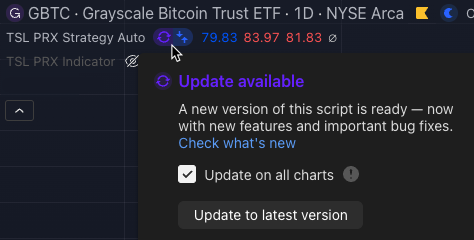
See this video for a quick introduction:
Examples & Settings
Select the model and the amount to risk (or capital to use) per trade.
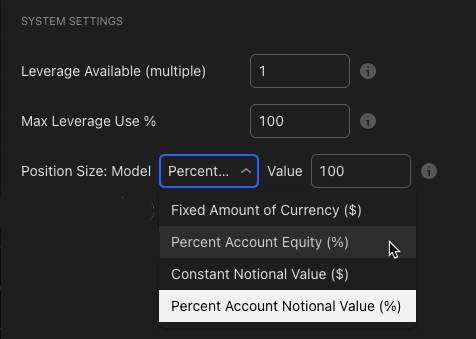
Example 1 - Fixed Amount of Currency ($):
To risk a fixed $100 USD on every trade enter 'Fixed Amount of Currency ($)' and '100' so 1R = $100. Note that for non-USD denominated Symbols (like BTC/ETH) this is the amount of the symbols base currency (i.e. ETH).
Example 2 - Percent Account Equity (%):
To risk 0.8% of account equity enter 'Percent Account Equity (%)' and '0.8' so 1R = 0.8% of Account Equity at the time the trade is placed. Note when using 'Percent Account Equity (%)' the starting account equity should be configured on the 'Properties' tab under * Initial Capital' and any backtests use that amount as the starting point.
Example 3 - Constant Notional Value ($):
To use a constant amount of capital for each trade like $10,000 enter 'Constant Notional Value ($)' and "10000'.
Example 4 - Percent Account Notional Value (%):
To use a percent of account capital for each trade like 20% of a $100k account (so $20k) for the trade size enter 'Percent Account Notional Value (%)' and '20'
We hope you enjoy!
Cheers,
The TSL Team